
🍊 PageGuide: Browser Extension to Assist Users in Navigating a Webpage and Locating Information

The first web agent that supports user verification by highlighting text spans and annotating image evidence.

🖍️ Highlights evidence in webpages and PDFs 🗺️ Guides website navigation 👁️ Answers visual questions

1
2

PageGuide demo: grounded answers on every page

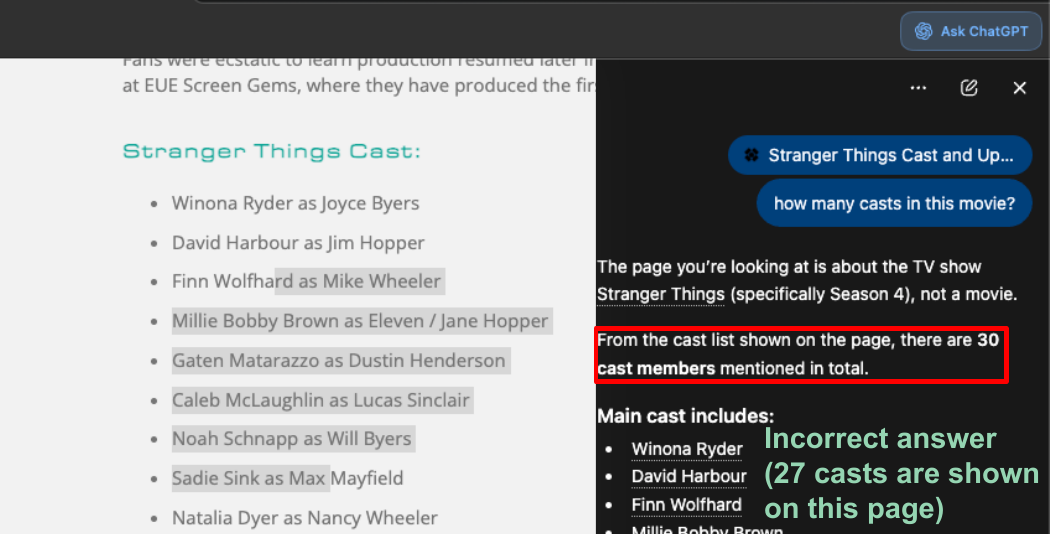
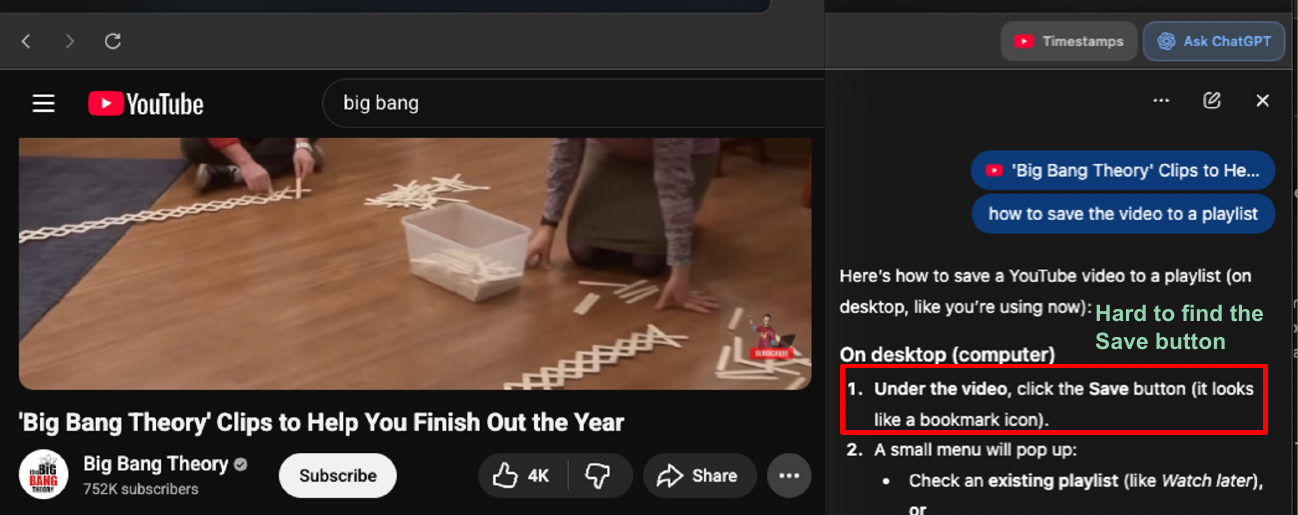
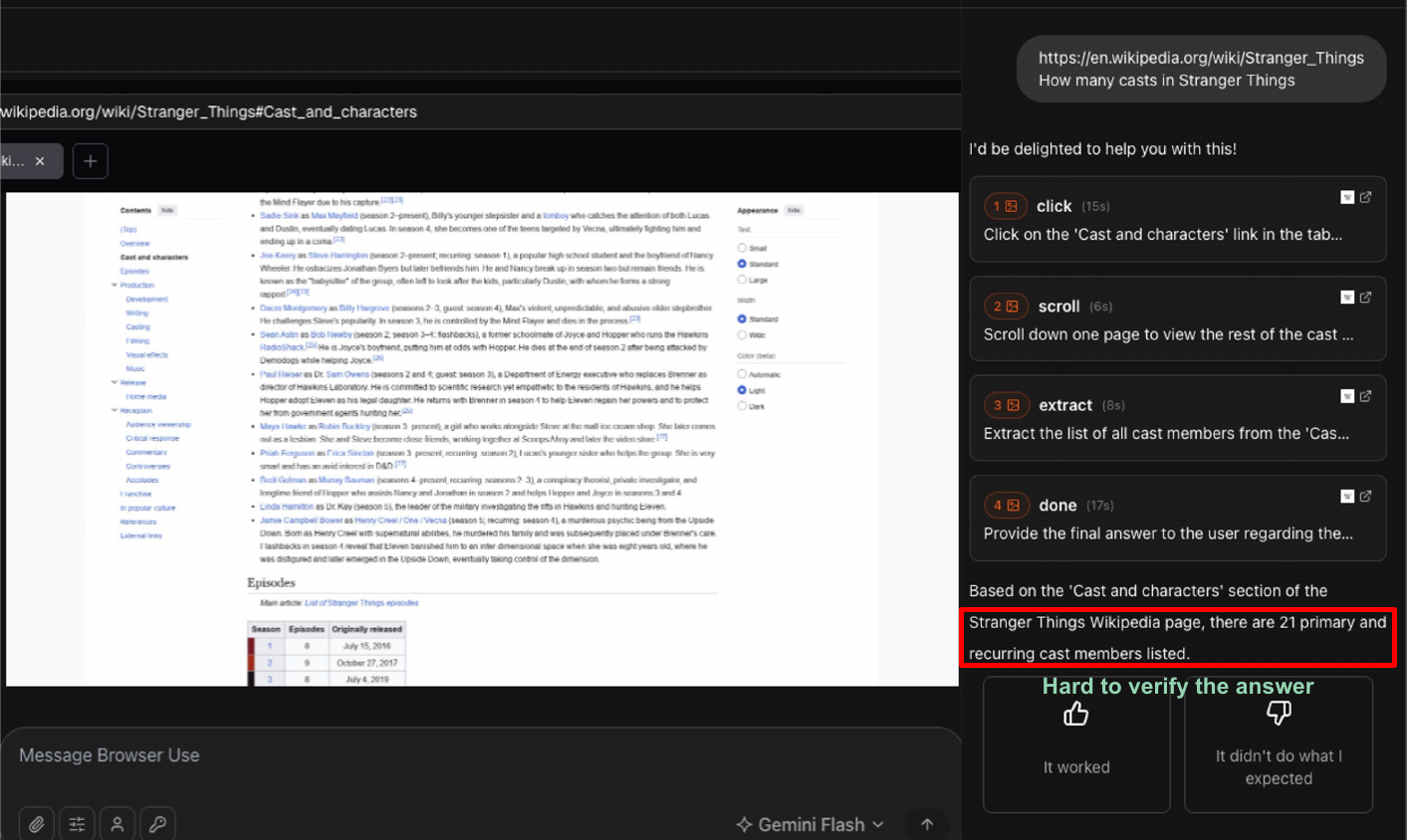
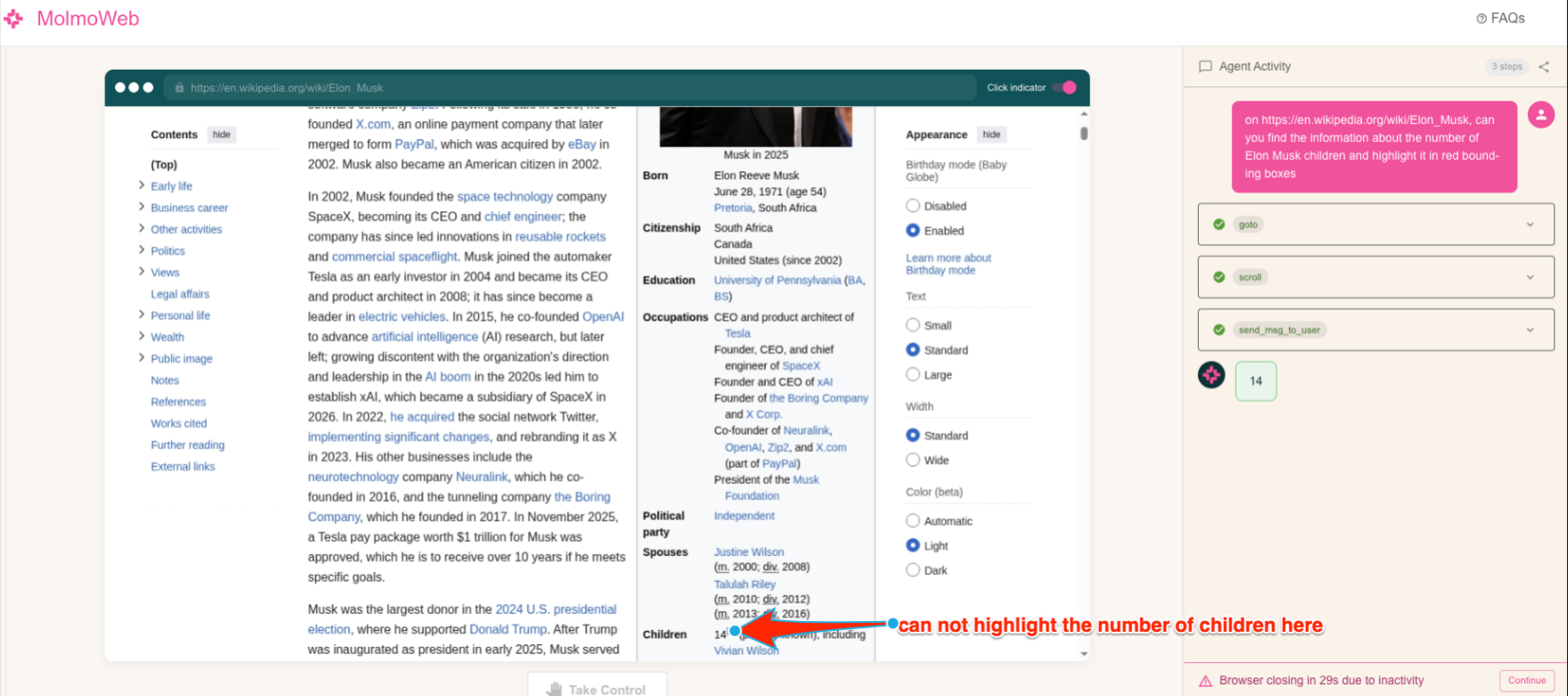
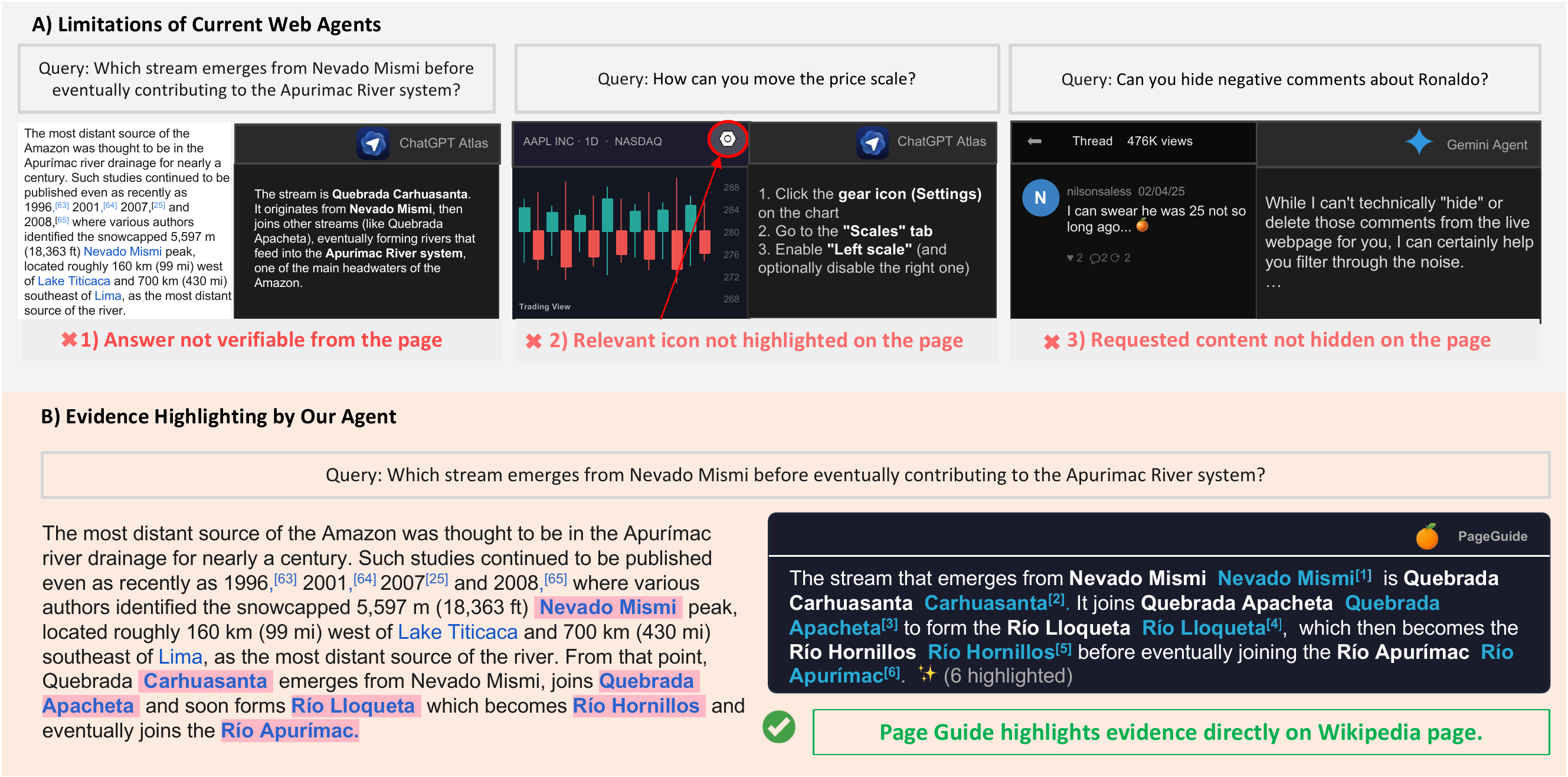
Why it matters: AI browsers often fail to cite references

Abstract

Users browsing the web daily struggle to quickly locate relevant information in cluttered pages, and complete multi-step web navigation tasks. State-of-the-art AI assistants (e.g., ChatGPT, Gemini, Claude) and browser agents (e.g., OpenAI Operator, Browser Use) can answer questions and automate actions, yet they return answers without showing where the information comes from on the page, forcing users to manually verify results and blindly trust every automated step.

We present 🍊 PageGuide, a browser extension that grounds LLM answers and actions not only in HTML DOM elements, but also in non-HTML DOM content, such as maps, images, charts, and timetables, addressing two core user needs:

  1. Find — locating and highlighting relevant evidence in-situ so users can instantly verify answers on the page;
  2. Guide — automatically guiding users through navigation tasks while capturing relevant evidence for each intermediate task.

In a within-subject user study (N = 53), PageGuide outperforms a non-grounding agent in both modes: in Find, it improves accuracy from 90.1% to 96.3% and reduces judge time from 155.6s to 133.0s; in Guide, it improves accuracy from 71.4% to 81.0%, with judge time rising from 70.4s to 109.8s as users spend the extra time inspecting grounded evidence across navigation steps rather than believing the answer blindly.

Motivation

🍊 See it in action

Real-world Application

Watch PageGuide ground LLM answers directly on live pages — highlighting evidence, guiding steps, reading PDFs, and answering visual questions.

Guide mode real-world demo

Method

PageGuide offers two interaction modes, each targeting a distinct user need. A lightweight intent router classifies each query and dispatches it to the appropriate handler (Find or Guide), which reads the live HTML DOM and non-HTML DOM content to ground its answer and evidence directly on the page.

PageGuide executing a task while keeping users in the process

Figure 3: PageGuide executes the task while keeping users in the process and showing verifiable evidence throughout the trajectory. Given the query "Find when Rec Center closes on Friday. Then order a banana on the grocery app for delivery after it closes.", (1) PageGuide first finds the Rec Center's Friday closing time and highlights the supporting evidence on the page. (2) Before proceeding, PageGuide pauses for user confirmation. (3) After approval, PageGuide navigates the grocery app, selects a banana, and schedules delivery for a valid time after the Rec Center closes. (4) PageGuide presents the complete trajectory together with the textual and visual evidence supporting each step, enabling the user to verify the final answer.

See full prompts in the paper →

System: Given a user query and a brief page context, classify the query into one of two handlers: find (factual lookup) or guide (step-by-step task). Return a JSON object with the handler, confidence score, and a one-sentence justification.

User: Query: "{query}"   Page context: {page_title, content_type}

Examples

"What is the price of this product?"
{"handler": "find", "confidence": 0.9, "reason": "Question about page content"}

"How do I report this video?"
{"handler": "guide", "confidence": 0.9, "reason": "How-to question needing step-by-step guidance"}

System: Given a user query and a structured HTML DOM element index, answer the query in natural language. For every factual claim, insert an inline citation in the format [N:"exact phrase"], where N is the element index and exact phrase is the verbatim text span supporting the claim.

User: Query: "{query}"   HTML DOM index: {element_id, text, tag, bbox}

Example

Q: "Who directed this movie?"
A: The movie was directed by Christopher Nolan [45:"Christopher Nolan"].

Q: "Who are the main actors?"
A: The main actors are Leonardo DiCaprio [23:"Leonardo DiCaprio"], Tom Hardy [27:"Tom Hardy"], and Ellen Page [31:"Ellen Page"].

System: Given a user task and a structured HTML DOM element index, produce one step at a time as a JSON action object — instruction text, target SoM index, action type (click, input, scroll), and a next-step hint. Guide the user ONE step at a time.

User: Task: "{query}"   Step: {step_number}   HTML DOM index: {element_id, text, tag, bbox}

Example

Q: "How do I report this video?" (Step 1)
{"step": 1, "instruction": "Click the three-dot menu (⋮) to see more options", "highlight": {"index": 5, "text": "⋮"}, "waitFor": "click", "isLastStep": false, "nextStepHint": "The menu will open with a Report option"}

(Step 2, after menu opened — PAGE INDEX now shows [20] Report)
{"step": 2, "instruction": "Click 'Report' to report this video", "highlight": {"index": 20, "text": "Report"}, "waitFor": "click", "isLastStep": true, "nextStepHint": "You'll see reporting options"}

Step-by-step help while the user stays in control

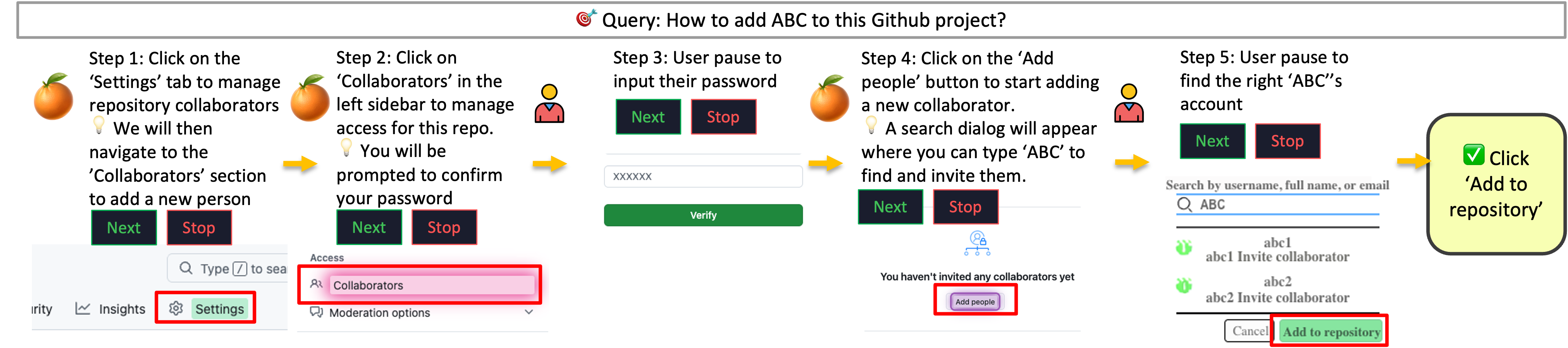
Guide mode example

Figure 2: Example of a Guide process. Given the query "Find me a parking lot near ABC Hall", PageGuide generates a step-by-step plan and presents one instruction at a time. At each step, the target UI element is highlighted directly on the page (e.g., Search), while the sidebar displays the corresponding instruction. When visual evidence is needed, PageGuide adds annotations (e.g., boxes, arrows, or stars) directly to the page to guide users to the relevant location or element. Finally, PageGuide provides an answer with clickable references; selecting a reference navigates the page directly to the corresponding evidence.

Show the exact evidence behind every answer

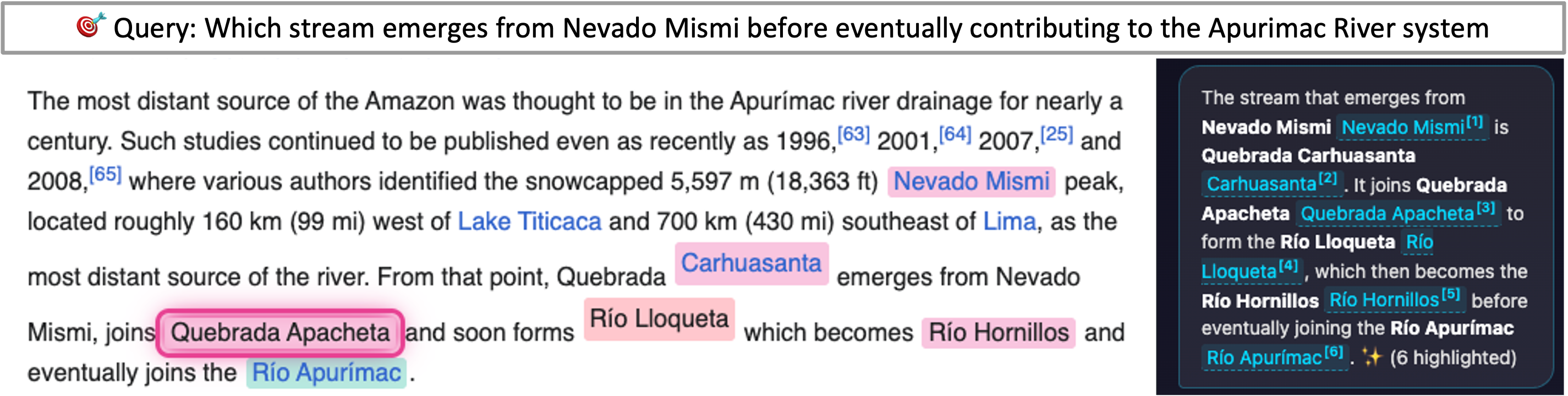
Find mode example

Figure 1: Given a query in the agent side panel on the right (powered by Gemini-3-Flash), PageGuide displays the full answer with clickable references that navigate to the corresponding highlighted evidence on the page (e.g., the page will jump to the location of the Nevado Mismi when clicking at Nevado Mismi[1]).

Navigate through FAQ sections step by step

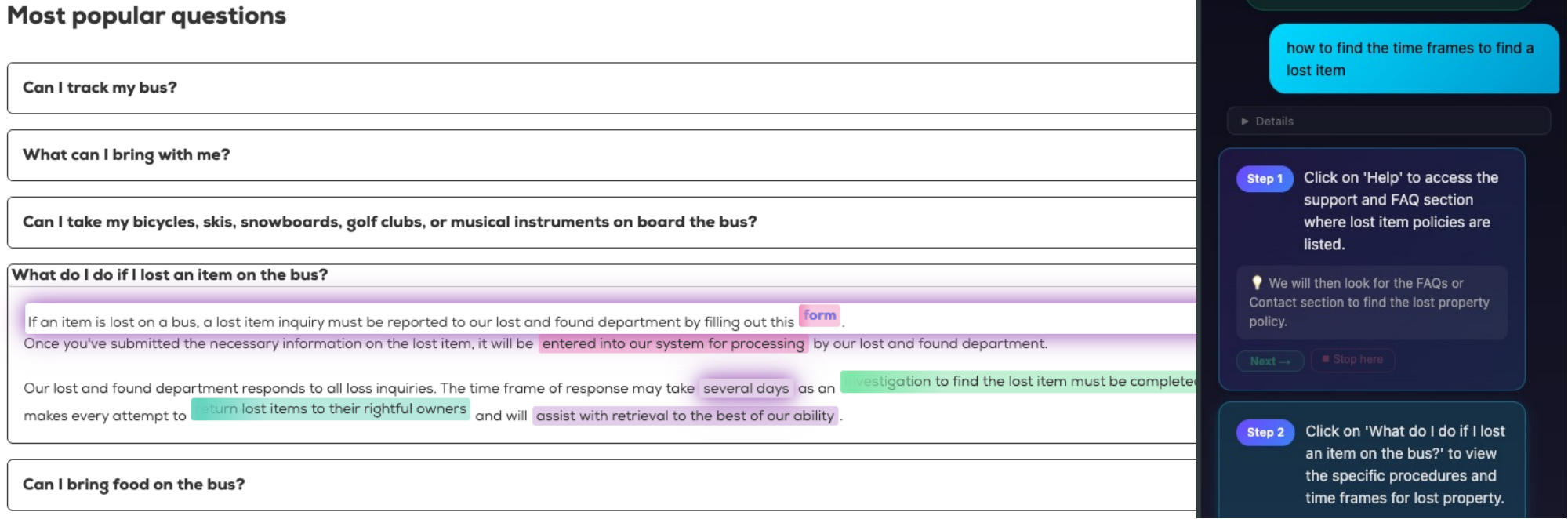
Guide mode example 2

Guide Example 2: Given the query "How to find the time frames to find a lost item?", PageGuide navigates the user through an FAQ page step by step. Each step highlights the target element on the page (e.g., form, entered into our system for processing) while the sidebar panel delivers the current instruction, a next-step hint, and Next / Stop controls.

Ask questions about any PDF — directly in the browser

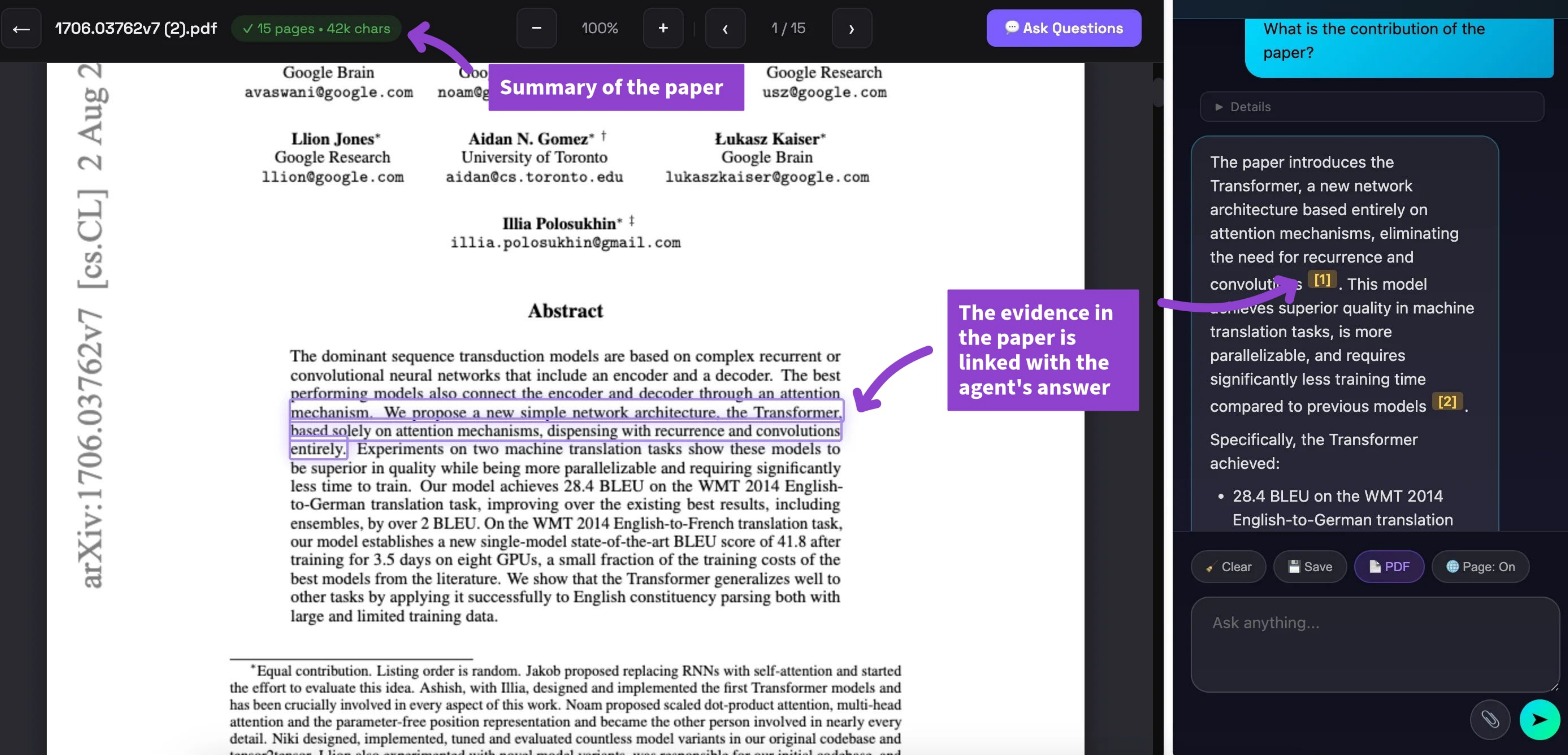
PDF Reading feature example

PDF Reading. When the user opens a PDF in the browser, PageGuide automatically detects the document and enables document-level Q&A. The agent reads the full PDF content and answers questions with inline citations, so users can verify every claim without leaving the browser tab.

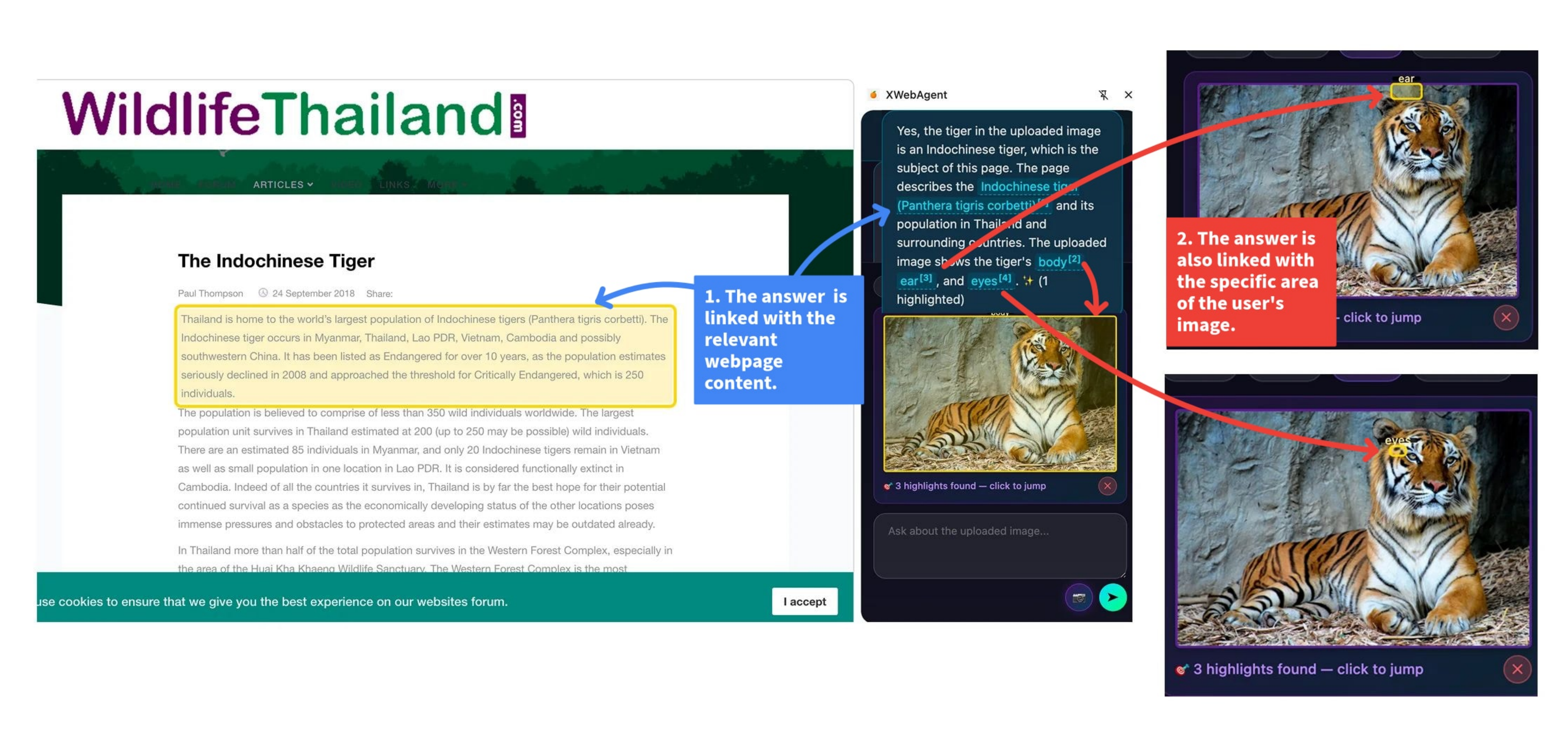
Answer questions about images and visual content on the page

Visual Question Answering feature example

Visual Q&A. For pages containing charts, diagrams, or images, PageGuide captures the relevant visual element and routes the query to a vision-capable model. Users can ask natural-language questions about any image on the page and receive grounded, evidence-backed answers without needing to open a separate tool.

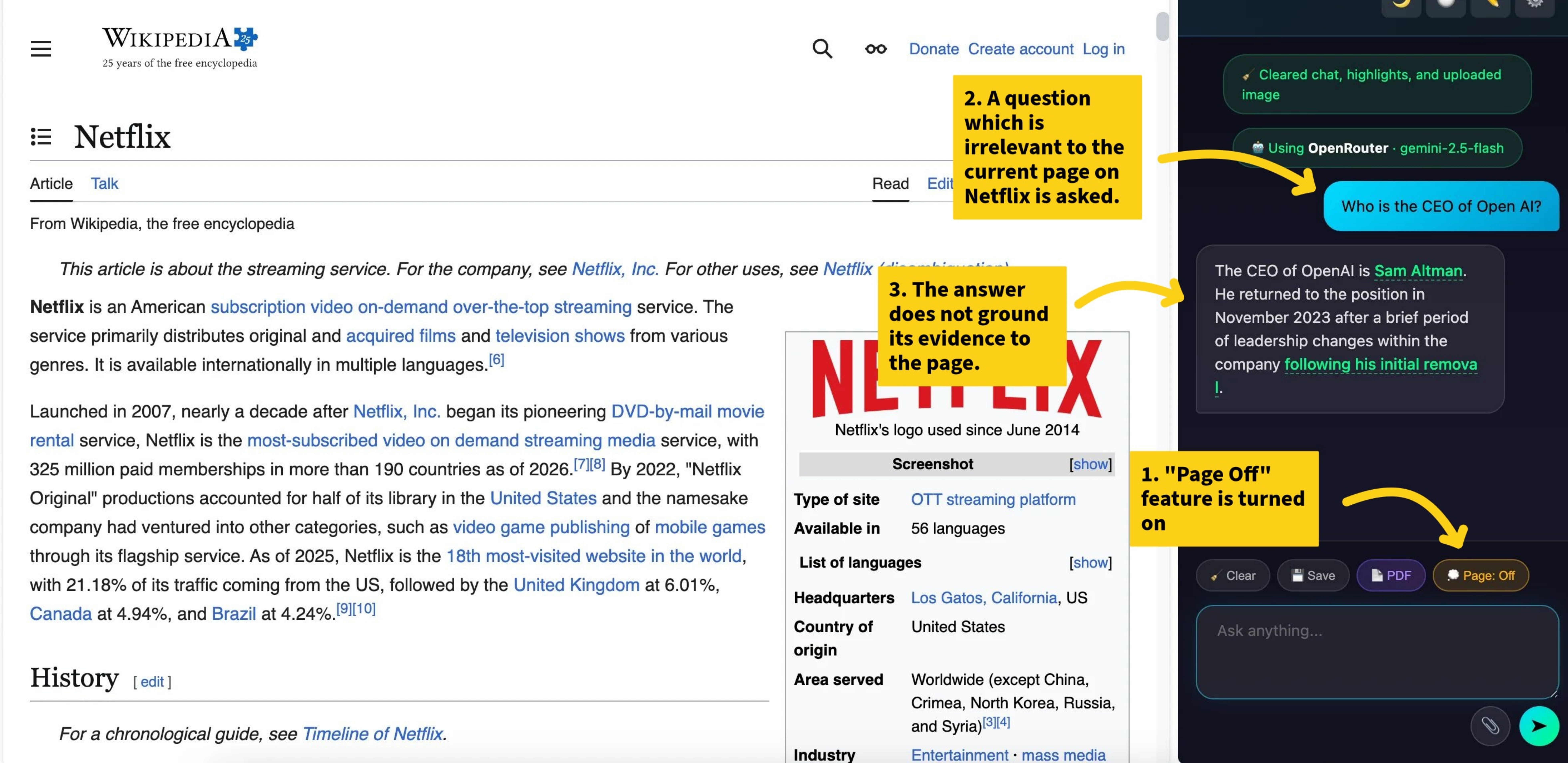
Turn off the page to reclaim your focus

Page Off feature example

Page Off. With a single click, PageGuide dims the entire page and blocks all interactive elements, helping users avoid distractions and stay focused. The overlay can be dismissed at any time, restoring the page to its original state without any permanent changes to the DOM.

User Study

We conducted a within-subject controlled study (N = 53) using Gemini-3-Flash as PageGuide's backbone, comparing a non-grounded condition (highlights and references turned off) against the grounded PageGuide condition, with counterbalanced ordering to mitigate learning effects. Each participant completed eight tasks across four task types — Find (Text Evidence), Find (Visual Evidence), Guide (Text Evidence), and Guide (Visual Evidence) — with a maximum of three minutes per task. We measured task accuracy, verification time, and mouse hovering behavioral signal, plus post-task Likert ratings.

Task accuracy across Find and Guide, text and visual evidence

Figure 4: Task accuracy comparing non-grounded and grounded (PageGuide) conditions across Find and Guide tasks. Text-evidence tasks require verification using textual content, while visual-evidence tasks require verification using visually rendered content such as images, maps, or charts. PageGuide improves accuracy across all four task types, with larger gains for Guide tasks (0.71 → 0.81) than for Find tasks (0.90 → 0.96).

Verification time across Find and Guide, text and visual evidence

Figure 5: Verification time (seconds) for the non-grounded and grounded (PageGuide) conditions. PageGuide reduces Find verification time (155.6s → 133.0s) but significantly increases Guide judge time (70.4s → 109.8s), reflecting deliberation spent inspecting grounded evidence rather than inefficiency.

Post-study Likert ratings for Find and Guide

Figure 6: Post-study Likert ratings show that users find both Find and Guide helpful for completing tasks, verifying supporting evidence, and identifying agent errors. Each mode includes three questions measuring whether PageGuide helps users identify relevant evidence or errors (F1/G1), makes the task easier to complete (F2/G3), and supports confidence in the agent's answer or task completion (F3/G2). Higher ratings indicate more positive perceptions.

Appendix Model Performance

Appendix D evaluates the model components behind PageGuide across routing, evidence finding, and guided task completion. Use the tabs to scan each finding without leaving the main results page.

Router 97.73% overall intent accuracy
Find 91.40% NQ answer correctness Gemini 3 Flash iconGemini 3 Flash
QASPER 38.76 best average Find score Gemini 3 Flash iconGemini 3 Flash
Guide 35.17% Online-Mind2Web average success Gemini 3 Flash iconGemini 3 Flash
Table 1

Intent routing is reliable across Find and Guide.

The router correctly classifies 1,076 of 1,101 queries. Guide queries are classified perfectly, while the remaining mistakes come from ambiguous Find requests.

Class Total Correct Accuracy Error Type
Find96994497.4%Guide x 25
Guide132132100.0%-
Overall1,1011,07697.73%25 total
Table 2

Gemini 3 Flash improves NQ answer correctness.

On Natural Questions, Gemini 3 Flash trades a small precision drop for higher recall, better F1, and a 12.91 point gain in answer correctness.

Model Precision Recall F1 Ans. Correctness
Gemini 2.5 Flash iconGemini 2.5 Flash65.2374.0966.0178.49
Gemini 3 Flash iconGemini 3 Flash63.9783.1768.6691.40
Delta-1.26+9.08+2.65+12.91
Table 3

Find improves evidence grounding on QASPER.

Both PageGuide model variants improve over LED-base. Gemini 3 Flash gives the strongest average score, while Gemini 2.5 Flash has the highest evidence F1.

Model Answer F1 Evidence F1 Avg
LED-base (baseline)33.6329.8531.74
Gemini 2.5 Flash iconGemini 2.5 Flash33.82 (+0.19)43.06 (+13.21)38.44 (+6.70)
Gemini 3 Flash iconGemini 3 Flash39.72 (+6.09)37.80 (+7.95)38.76 (+7.02)
Delta+5.90-5.26+0.32
Table 4

Guide performs best with Gemini 3 Flash.

On Online-Mind2Web, PageGuide with Gemini 3 Flash improves across every difficulty split and exceeds the SeeAct baseline average by 5.17 points.

Agent Backbone Easy Medium Hard Avg
SeeAct-51.8028.009.5030.00
PageGuideGemini 2.5 Flash iconGemini 2.5 Flash52.5024.4814.2930.42
PageGuideGemini 3 Flash iconGemini 3 Flash60.7626.5718.1835.17
DeltaGemini 3 - 2.5+8.26+2.09+3.89+4.75

Source: Appendix D of the PageGuide paper. Gemini model labels follow Appendix E; deltas compare Gemini 3 Flash against Gemini 2.5 Flash.

User Notes

Open-ended comments participants left after individual trials in our user study (Section 4.3 of the paper). No participant complained about PageGuide itself; the non-grounded condition drew the opposite complaint — not that the agent was wrong, but that its answer was unverifiable.

GroundedHighlighted text helped.
Non-groundedIt's very difficult to double-check the agent on non-grounded tasks.
Non-groundedI don't know if the agent's answer is correct or not because I cannot see the information on the page myself.
GroundedThe screenshots really helped.
Non-groundedI can only see the output, so it's unclear if it hallucinated or not.
Non-groundedI guess I make the assumption that the 3rd item in the cart is the orange, even though I can't see that for certain.

BibTeX

@article{nguyen2026pageguide,
  title={PageGuide: Browser extension to assist users in navigating a webpage and locating information},
  author={Nguyen, Tin and Truong, Thang T and Zhou, Runtao and Bui, Trung and Agarwal, Chirag and Nguyen, Anh Totti},
  journal={arXiv preprint arXiv:2604.23772},
  year={2026}
}